Broadlink RM-Pro Wi-Fi
Broadlink RM-Pro Wi-Fi RF Remote Controller for Smart Home EPATH-369673
http://www.tinydeal.com/ru/broadlink-rm-pro-wi-fi-rf-remote-controller-for-smart-home-p-145987.html
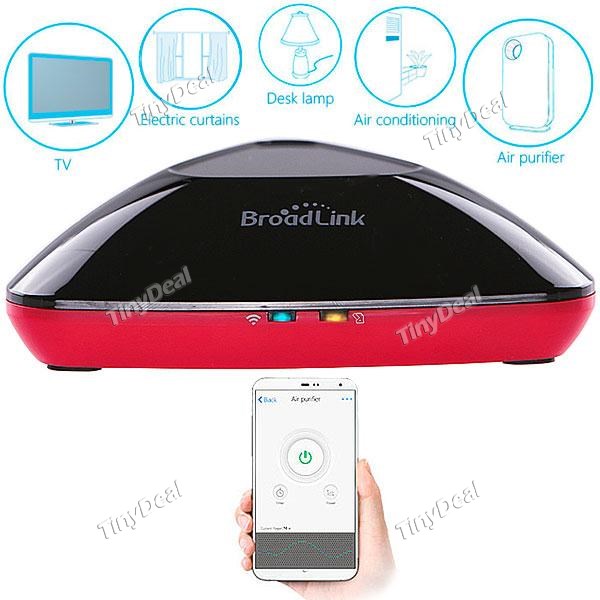
Product Features:
Easy Configuration
Connect to your home and office Wi-Fi, no gateway needed.
Theme Setting
Consecutive actions will be taken by just one click.
Smart Control
Control your devices anywhere at anytime through the app "e-Control".
Scheduling
Preset your own profiles, automatically work at set time.
Auto Home / Away
Automatically turn on / off the appliances when you are going backing / left home.
Product Specifications:
Using Guidance:
To Download APP:
1.Scan the QR code which printed on the packing box, user manual or shown on below to download and install the APP.
2.For Android user, please search “Broadlink e-control” in Google Play to download and install the APP. For APPLE user,please search
“Broadlink e-control” in APP store or in iTunes to download and install the APP.
To start up:
1.Plug in your RM-pro / RM-home,your will find that the blue Wi-Fi indicating light is on and flashing fast (5 times per second). If not, please reset your device.
2.Firstly, link your phone to your own Wi-Fi. Secondly,operate your “Broadlink e-control ” on your smart phone. Third, press the “+” on the top right hand
and select “add remote control”.
3.Input WI-Fi password to configure and click “configure” on the button.
4.The blue Wi-Fi indicating light is flashing slowly now (once per second). After being wait for about 60 seconds,the configuration is finish.
The RM is linked to your smartphone through your own Wi-Fi.The blue Wi-Fi indicating light is off at this moment.
To add remote controller (Take TV for example):
1. After configuration,go back to “control” main screen,click “+” on the top right hand to add remote.
2. Select “TV”.
3. To learn control signal:
Click the remote button on your smartphone,the orange indicating light will turn on at this moment.
Aim at the RM,press the corresponding button which you want to be learned on your original remote.
After learning all the button,you can abandon your original remote and control your TV by your smartphon.
To reset the RM:
1.Plug in your RM.
2.Try to find a needle or toothpick which is small enough to insert the “Reset” hole and press it for about 5 seconds until the blue
Wi-Fi indicating light is flashing fast (5 times per second). Then resetting your RM is finished.
Introduction
Traditionally, "home automation" is a luxury product for premium class customers. Every equipment and appliances had to be redesigned for installing home automation system.
However, this remote controller hub, Broadlink RM Pro allows you to design your own home automation theme with traditional appliances.
RM Pro can replace all traditionalcontroller controlling RF and IR appliances. You can just use your smartphone to control all appliances anywhere at any time once you can access the internet.
In coordinate with the app “e-Control”, not only control the power on / off of appliances, you can preset scheduling, theme, etc.
--------------------------------------------------------------------------------
Technical Support : Downloading "e-Control" Apps for Freeримечание:
1) Ожидаемый срок поставки включает время обработки и реальное время доставки.Обычно наше время обработки занимает 1-2 рабочие дня.
2) Ожидаемый срок поставки, который показан выше, только для справки, так как реальное время доставки зависит от выбирания метода доставки, плана перевозкси и местное время таможенного оформления, особенно в периоды пик.
3) Стоимость доставки показаной доставки включает сбор топлива, которая может изменять немного из колебания валютного курса.
4) Для заказы одого товара: (только один товар):
a. Если стоимости вашего товара менше, чем 20 доларов и требует зарегистрированной доставки, вам нужно выплатить определённую трату эскалации.
b. Если стоимости вашего товара больше, чем 20 доллара, наша система доставит ваш товар с номером отслеживания автоматично и бесплатно.
5) Для заказа многочисленных товаров:(многочисленные товары):
a. Если стоимости большинства товара больше, чем 20 доллара, мы доставим ваши товары с номером отслеживания бесплатно.
b. Если большинство товаров в одной заказе дещёво, но у него правомерный вес и объём, наш расчётный процесс сможет различить эти приказы, которые дают зарегистрированную доставку.
c. Если большинство товаров в одной заказе дещёво, но у него относительный большой вес ( то есть стоимость и вес не находятся в рациональном пределе.) Мы будем взимать скиданную определённую трату эскалации, в случае вам нужен номер отслеживания.
Таможенная пошлина:
A. Стоимость товара или доставки не включает налоги импорта, пошлины. Это ответственность покупателей.
B. Попросите, пожалуйста, офис таможенной пошлины вашей страны и определите эти олнительные расходы,прежде покупки.
Политика возвращения товара:
Все мобильники,купленны на сайта Tinydeal.com, предоставятся 6-месячную гарантию и другие товары -- 3-месячную. Узнать дополнительную информацию, обращайтесь, пожалуйста, к нашему разделому Посдавка И Возврат или FAQ Политики возвращения товара.